
项目搭建
from flask import Flask

app=Flask(__name__)

@app.router('/')
def index():
    return "hello world"

if __name__=="__main__":
    app.run(port=4000,debug=True)
运行结果
 * Serving Flask app "app" (lazy loading)
 * Environment: production
   WARNING: This is a development server. Do not use it in a production deployment.
   Use a production WSGI server instead.
 * Debug mode: on
 * Restarting with watchdog (windowsapi)
 * Debugger is active!
 * Debugger PIN: 130-270-748
 * Running on http://127.0.0.1:4000/ (Press CTRL+C to quit)
路由与传参
路由
现代Web框架使用路由技术来帮助用户记住应用程序URL。 无需从主页导航即可直接访问所需页面。
Flask中的route()装饰器用于将URL绑定到函数。 例如 -
@app.route('/hello')
def hello_world():
    return 'hello world'
这里,URL /hello规则绑定到hello_world()函数。 因此,如果用户访问URL : http://localhost:5000/hello ,就会调用hello_world()函数,这个函数中的执行的结果输出将在浏览器中呈现。
应用程序对象的add_url_rule()函数也可用于将URL与函数绑定,如上例所示,使用route()。
def hello_world():
    return 'hello world'

app.add_url_rule('/', 'hello', hello_world)
传参
可以通过将可变部分添加到规则参数来动态构建URL。 这个变量部分被标记为<variable-name>。 它作为关键字参数传递给规则所关联的函数。
在以下示例中,route()装饰器的规则参数包含附加到URL /hello的<name>变量部分。 因此,如果在浏览器中输入URL: http://localhost:5000/hello/YiibaiYiibai,那么 ‘YiibaiYiibai’ 将作为参数提供给hello()函数。
参考如下代码 -
from flask import Flask
app = Flask(__name__)

@app.route('/hello/<name>')
def hello_name(name):
    return 'Hello %s!' % name

if __name__ == '__main__':
app.run(debug = True)将上面的脚本保存到文件:hello.py,并从Python shell运行它。
接下来,打开浏览器并输入URL => http://localhost:5000/hello/YiibaiYiibai。在浏览器中输出如下所示 -

除了默认的字符串变量部分之外,还可以使用以下转换器构造规则 -
| 编号 | 转换器 | 描述 |
|---|---|---|
| 1 | int | 接受整数 |
| 2 | float | 对于浮点值 |
| 3 | path | 接受用作目录分隔符的斜杠符(/) |
在下面的代码中,使用了所有这些构造函数。
from flask import Flask
app = Flask(__name__)

@app.route('/blog/<int:postID>')
def show_blog(postID):
    return 'Blog Number %d' % postID

@app.route('/rev/<float:revNo>')
def revision(revNo):
    return 'Revision Number %f' % revNo

if __name__ == '__main__':
    app.run()
从Python Shell运行上述代码。 在浏览器中访问URL => http:// localhost:5000/blog/11。
给定的数字值作为:show_blog()函数的参数。 浏览器显示以下输出 -
Blog Number 11
Shell
在浏览器中输入此URL - http://localhost:5000/rev/1.1
revision()函数将浮点数作为参数。 以下结果出现在浏览器窗口中 -
Revision Number 1.100000
Shell
Flask的URL规则基于Werkzeug的路由模块。 这确保了形成的URL是唯一的,并且基于Apache制定的先例。
考虑以下脚本中定义的规则 -
from flask import Flask
app = Flask(__name__)

@app.route('/flask')
def hello_flask():
    return 'Hello Flask'

@app.route('/python/')
def hello_python():
    return 'Hello Python'

if __name__ == '__main__':
app.run()两条规则看起来都很相似,但在第二条规则中,使用了尾部斜线(/)。 因此,它变成了一个规范的URL。 因此,使用/python或/python/返回相同的输出。 但是,在第一条规则的情况下, URL:/flask/会导致404 Not Found页面。
request传参(?index1=value1&index2=value2···)
from flask import Flask,request

app=Flask(__name__)

@app.router('/',methods=['GET','POST'])
def index():
    if request.method=='GET':
        name=request.get('name')
        return 'hello '+name

if __name__=="__main__":
    app.run()
请求链接http://127.0.0.1/?name=jack
结果

URL构建
url_for()函数对于动态构建特定函数的URL非常有用。 该函数接受函数的名称作为第一个参数,并接受一个或多个关键字参数,每个参数对应于URL的变量部分。
以下脚本演示了使用url_for()函数。
from flask import Flask, redirect, url_for
app = Flask(__name__)

@app.route('/admin')
def hello_admin():
    return 'Hello Admin'

@app.route('/guest/<guest>')
def hello_guest(guest):
    return 'Hello %s as Guest' % guest

@app.route('/user/<name>')
def user(name):
    if name =='admin':
        return redirect(url_for('hello_admin'))
    else:
        return redirect(url_for('hello_guest',guest = name))

if __name__ == '__main__':
    app.run(debug = True)
上面的脚本有一个函数用户(名称),它接受来自URL的参数值。
User()函数检查收到的参数是否与’admin’匹配。 如果匹配,则使用url_for()将应用程序重定向到hello_admin()函数,否则将该接收的参数作为guest参数传递给hello_guest()函数。
保存上面的代码到一个文件:hello.py,并从Python shell运行。
打开浏览器并输入URL - http://localhost:5000/user/admin
浏览器中的应用程序响应输出结果是 -
Hello Admin
Shell
在浏览器中输入以下URL - http://localhost:5000/user/mvl
应用程序响应结果现在变为 -
Hello mvl as GuestHTTP方法
Http协议是万维网数据通信的基础。 它协议定义了从指定URL中检索不同数据的方法。
下表概括了不同的http方法 -
| 编号 | 方法 | 描述 |
|---|---|---|
| 1 | GET | 将数据以未加密的形式发送到服务器,这最常用的方法。 |
| 2 | HEAD | 与GET相同,但没有响应主体 |
| 3 | POST | 用于将HTML表单数据发送到服务器。通过POST方法接收的数据不会被服务器缓存。 |
| 4 | PUT | 用上传的内容替换目标资源的所有当前表示。 |
| 5 | DELETE | 删除由URL给出的所有目标资源的所有表示 |
默认情况下,Flask路由响应GET请求。 但是,可以通过为route()装饰器提供方法参数来更改此首选项。
为了演示在URL路由中使用POST方法,首先创建一个HTML表单并使用POST方法将表单数据发送到URL。
将以下脚本保存到文件:login.html
<html>
<head>
    <meta http-equiv="Content-Type" content="text/html; charset=utf-8"/>
    <title>Flask HTTP请求方法处理</title>
</head>
   <body>
      <form action = "http://localhost:5000/login" method = "post">
         <p>输入姓名:</p>
         <p><input type = "text" name = "name" value=""/></p>
         <p><input type = "submit" value = "提交" /></p>
      </form>

   </body>
</html>
现在在Python shell中输入以下脚本。
from flask import Flask, redirect, url_for, request
app = Flask(__name__)

@app.route('/success/<name>')
def success(name):
    return 'welcome %s' % name

@app.route('/login',methods = ['POST', 'GET'])
def login():
    if request.method == 'POST':
        user = request.form['name']
        return redirect(url_for('success',name = user))
    else:
        user = request.args.get('name')
        return redirect(url_for('success',name = user))

if __name__ == '__main__':
app.run(debug = True)开发服务器开始运行后,在浏览器中打开login.html,在文本字段中输入名称(如:maxsu )并单击提交。
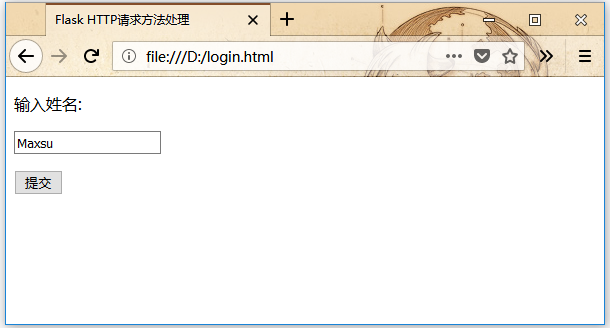
表单数据被提交到<form>标签的action属性指定的URL。
http://localhost:5000/login被映射到login()函数。 由于服务器已通过POST方法接收数据,因此从表单数据获得'name'参数的值,通过以下方式-
user = request.form['name']
Python它作为可变部分传递给URL:/success。 浏览器在窗口中显示欢迎消息。

将login.html中的方法参数更改为GET并在浏览器中再次打开。 在服务器上收到的数据是通过GET方法。 'name'参数的值现在通过以下方式获得 -
User = request.args.get('name')
Python这里,args是字典对象,它包含一系列表单参数及其对应值。 与之前一样,与'name'参数对应的值将传递到URL:/success。
模板
Flask可以以HTML形式返回绑定到某个URL的函数的输出。 例如,在以下脚本中,hello()函数将使用附加的<h1>标记呈现‘Hello World’ 。
from flask import Flask
app = Flask(__name__)

@app.route('/')
def index():
    return '<html><body><h1>'Hello World'</h1></body></html>'

if __name__ == '__main__':
    app.run(debug = True)
Python
但是,从Python代码生成HTML内容非常麻烦,尤其是在需要放置可变数据和Python语言元素(如条件或循环)时。经常需要转义HTML代码。
它可以利用Jinja2模板引擎技术,而不需要从函数返回硬编码HTML。如下代码所示,可以通过render_template()函数渲染HTML文件。
from flask import Flask
app = Flask(__name__)

@app.route('/')
def index():
   return render_template(‘hello.html’)

if __name__ == '__main__':
   app.run(debug = True)
PythonFlask将尝试在该脚本所在的同一文件夹中查找templates文件夹中的HTML文件。使用模板的应用程序目录结构如下所示 -
app.py
hello.py
    templates
        hello.html
        register.html
        ....
Shell
术语“Web模板系统”是指设计一个HTML脚本,其中可以动态插入变量数据。 Web模板系统由模板引擎,某种数据源和模板处理器组成。
Flask使用jinga2模板引擎。 Web模板包含用于变量和表达式(这些情况下为Python表达式)的HTML语法散布占位符,这些变量和表达式在模板呈现时被替换为值。
以下代码在模板(templates)文件夹中保存为:hello.html。
<html>
<head>
<meta http-equiv="Content-Type" content="text/html; charset=utf-8" />
<title>Flask HTTP请求方法处理</title>
</head>
   <body>

      <h1>Hello {{ name }}!</h1>

   </body>
</html>
HTML接下来,将以下代码保存在app.py文件中,并从Python shell运行 -
from flask import Flask, render_template
app = Flask(__name__)

@app.route('/hello/<user>')
def hello_name(user):
    return render_template('hello.html', name = user)

if __name__ == '__main__':
    app.run(debug = True)
Python
在开发服务器开始运行时,打开浏览器并输入URL为 - http://localhost:5000/hello/maxsu
URL的可变部分插入{{name}}占位符处。

Jinja2模板引擎使用以下分隔符来从HTML转义。
{% ... %}用于多行语句{{ ... }}用于将表达式打印输出到模板{# ... #}用于未包含在模板输出中的注释# ... ##用于单行语句
在以下示例中,演示了在模板中使用条件语句。 hello()函数的URL规则接受整数参数。 它传递给hello.html模板。 在它里面,收到的数字(标记)的值被比较(大于或小于50),因此在HTML执行了有条件渲染输出。
Python脚本如下 -
from flask import Flask, render_template
app = Flask(__name__)

@app.route('/hello/<int:score>')
def hello_name(score):
    return render_template('hello.html', marks = score)

if __name__ == '__main__':
    app.run(debug = True)
Python模板文件:hello.html 的HTML模板脚本如下 -
<html>
<head>
<meta http-equiv="Content-Type" content="text/html; charset=utf-8" />
<title>Flask模板示例</title>
</head>
   <body>

      {% if marks>50 %}
      <h1> 通过考试!</h1>
      {% else %}
      <h1>未通过考试!</h1>
      {% endif %}

   </body>
</html>
HTML请注意,条件语句if-else和endif包含在分隔符{%..。%}中。
运行Python脚本并访问URL=> http://localhost/hello/60 ,然后访问 http://localhost/hello/59,以有条件地查看HTML输出。
Python循环结构也可以在模板内部使用。 在以下脚本中,当在浏览器中打开URL => http:// localhost:5000/result时,result()函数将字典对象发送到模板文件:results.html 。
result.html 的模板部分采用for循环将字典对象result{}的键和值对呈现为HTML表格的单元格。
从Python shell运行以下代码。
from flask import Flask, render_template
app = Flask(__name__)

@app.route('/result')
def result():
    dict = {'phy':59,'che':60,'maths':90}
    return render_template('result.html', result = dict)

if __name__ == '__main__':
    app.run(debug = True)
Python将以下HTML脚本保存为模板文件夹(templates)中的模板文件:result.html 。
<html>
<head>
<meta http-equiv="Content-Type" content="text/html; charset=utf-8" />
<title>Flask模板示例</title>
</head>
   <body>
      <table border = 1>
         {% for key, value in result.items() %}
            <tr>
               <th> {{ key }} </th>
               <td> {{ value }} </td>
            </tr>
         {% endfor %}
      </table>
   </body>
</html>
HTML在这里,与For循环相对应的Python语句包含在{%...%}中,而表达式键和值放在{{}}中。
开发开始运行后,在浏览器中打开http://localhost:5000/result以获得以下输出。

静态文件
Web应用程序通常需要一个静态文件,例如支持显示网页的JavaScript文件或CSS文件。 通常,可以通过配置Web服务器提供这些服务,但在开发过程中,这些文件将从包中的静态文件夹或模块旁边提供,它将在应用程序的/static上提供。
使用特殊的端点“静态”来为静态文件生成URL。
在以下示例中,index.html中的HTML按钮的OnClick事件调用hello.js中定义的javascript函数,该函数在Flask应用程序的URL => / 中呈现。
from flask import Flask, render_template
app = Flask(__name__)

@app.route("/")
def index():
    return render_template("index.html")

if __name__ == '__main__':
    app.run(debug = True)
Python
index.html 中的HTML脚本如下所示。
<html>
   <head>
      <script type = "text/javascript"
         src = "{{ url_for('static', filename = 'hello.js') }}" ></script>
   </head>
   <body>
      <input type = "button" onclick = "sayHello()" value = "Say Hello" />
   </body>
</html>文件:hello.js 中定义包含 sayHello() 函数。
function sayHello() {
   alert("Hello World")
}
请求对象
来自客户端网页的数据作为全局请求对象发送到服务器。要处理请求数据,请求对旬应该从Flask模块导入。
请求对象的重要属性如下所列 -
form- 它是包含表单参数及其值的键和值对的字典对象。args- 解析问号(?)后的URL部分查询字符串的内容。cookies- 保存Cookie名称和值的字典对象。file- 与上传文件有关的数据。method- 当前请求方法。
表单处理
我们已经看到,可以在URL规则中指定http方法。URL映射的函数接收到的表单数据可以以字典对象的形式收集,并将其转发给模板以在相应的网页上呈现它。
在以下示例中,URL => / 呈现具有表单的网页(student.html)。填充的数据会提交到触发result()函数的URL => /result 中。
results()函数收集字典对象中request.form中存在的表单数据,并将其发送给result.html 并显示出来。
该模板动态呈现表单数据的HTML表格。
下面给出的是Python的应用程序代码 -
from flask import Flask, render_template, request
app = Flask(__name__)

@app.route('/')
def student():
    return render_template('student.html')

@app.route('/result',methods = ['POST', 'GET'])
def result():
    if request.method == 'POST':
        result = request.form
        return render_template("result.html",result = result)

if __name__ == '__main__':
    app.run(debug = True)
Python
以下是 student.html 的HTML脚本的代码。
<html>
<head>
<meta http-equiv="Content-Type" content="text/html; charset=utf-8" />
<title>Flask示例</title>
</head>
   <body>

      <form action = "http://localhost:5000/result" method = "POST">
         <p>姓名 <input type = "text" name = "Name" /></p>
         <p>物理分数: <input type = "text" name = "Physics" /></p>
         <p>化学分数: <input type = "text" name = "Chemistry" /></p>
         <p>数学分数: <input type ="text" name = "Mathematics" /></p>
         <p><input type = "submit" value = "提交" /></p>
      </form>

   </body>
</html>
HTML
模板代码(result.html)在下面给出 -
<html>
<head>
<meta http-equiv="Content-Type" content="text/html; charset=utf-8" />
<title>Flask示例</title>
</head>
   <body>

      <table border = 1>
         {% for key, value in result.items() %}
            <tr>
               <th> {{ key }} </th>
               <td> {{ value }} </td>
            </tr>
         {% endfor %}
      </table>

   </body>
</html>
HTML
运行Python脚本,并在浏览器中输入URL => http://localhost:5000/ 。结果如下所示 -

当点击提交按钮时,表单数据以HTML表格的形式呈现在result.html 中,如下所示 -

Cookies处理
Cookie以文本文件的形式存储在客户端计算机上。 其目的是记住和跟踪与客户使用有关的数据,以获得更好的访问体验和网站统计。
Request对象包含一个cookie的属性。 它是所有cookie变量及其对应值的字典对象,客户端已发送。 除此之外,cookie还会存储其到期时间,路径和站点的域名。
在Flask中,cookies设置在响应对象上。 使用make_response()函数从视图函数的返回值中获取响应对象。 之后,使用响应对象的set_cookie()函数来存储cookie。
重读cookie很容易。 可以使用request.cookies属性的get()方法来读取cookie。
在下面的Flask应用程序中,当访问URL => / 时,会打开一个简单的表单。
@app.route('/')
def index():
    return render_template('index.html')
Python
这个HTML页面包含一个文本输入,完整代码如下所示 -
<html>
<head>
<meta http-equiv="Content-Type" content="text/html; charset=utf-8" />
<title>Flask Cookies示例</title>
</head>
   <body>

      <form action = "/setcookie" method = "POST">
         <p><h3>Enter userID</h3></p>
         <p><input type = 'text' name = 'name'/></p>
         <p><input type = 'submit' value = '登录'/></p>
      </form>

   </body>
</html>
HTML
表单提交到URL => /setcookie。 关联的视图函数设置一个Cookie名称为:userID,并的另一个页面中呈现。
@app.route('/setcookie', methods = ['POST', 'GET'])
def setcookie():
   if request.method == 'POST':
        user = request.form['name']

        resp = make_response(render_template('readcookie.html'))
        resp.set_cookie('userID', user)

        return resp
Python
readcookie.html 包含超链接到另一个函数getcookie()的视图,该函数读回并在浏览器中显示cookie值。
@app.route('/getcookie')
def getcookie():
    name = request.cookies.get('userID')
    return '<h1>welcome '+name+'</h1>'
Python
完整的应用程序代码如下 -
from flask import Flask
from flask import render_template
from flask import request
from flask import make_response

app = Flask(__name__)

@app.route('/')
def index():
    return render_template('index.html')

@app.route('/setcookie', methods = ['POST', 'GET'])
def setcookie():
    if request.method == 'POST':
        user = request.form['name']

        resp = make_response(render_template('readcookie.html'))
        resp.set_cookie('userID', user)
        return resp

@app.route('/getcookie')
def getcookie():
    name = request.cookies.get('userID')
    print (name)
    return '<h1>welcome, '+name+'</h1>'

if __name__ == '__main__':
    app.run(debug = True)
Python
运行该应用程序并访问URL => http://localhost:5000/

设置cookie的结果如下所示 -

重读cookie的输出如下所示 -

Sessions会话
与Cookie不同,会话数据存储在服务器上。 会话是客户端登录到服务器并注销的时间间隔。 需要在此会话中进行的数据存储在服务器上的临时目录中。
与每个客户端的会话分配一个会话ID。 会话数据存储在cookie顶部,服务器以加密方式签名。 对于这种加密,Flask应用程序需要一个定义SECRET_KEY。
会话对象也是一个包含会话变量和关联值的键值对的字典对象。
例如,要设置'username'会话变量,请使用语句 -
Session['username'] = 'admin'
Python要删除会话变量,请使用pop()方法。
session.pop('username', None)
Python
以下代码是Flask中会话如何工作的简单演示。 URL => '/' 提示用户登录,因为会话变量username没有设置。
@app.route('/')
def index():
   if 'username' in session:
      username = session['username']
         return 'Logged in as ' + username + '<br>' + \
         "<b><a href = '/logout'>click here to log out</a></b>"
   return "You are not logged in <br><a href = '/login'></b>" + \
      "click here to log in</b></a>"
Python当用户浏览到URL=>'/login'时,login()函数显示视图,因为它是通过GET方法调用的,所以打开一个登录表单。
表单填写后重新提交到URL=> /login,现在会话变量被设置。 应用程序被重定向到URL=> /。 这时找到会话变量:username。
@app.route('/login', methods = ['GET', 'POST'])
def login():
   if request.method == 'POST':
      session['username'] = request.form['username']
      return redirect(url_for('index'))
   return '''
   <form action = "" method = "post">
      <p><input type = text name = "username"/></p>
      <p<<input type = submit value = Login/></p>
   </form>
   '''
Python该应用程序还包含一个logout()视图函数,它删除’username’会话变量的值。 再次 URL 跳转到 ‘/‘ 显示开始页面。
@app.route('/logout')
def logout():
   # remove the username from the session if it is there
   session.pop('username', None)
   return redirect(url_for('index'))
Python运行应用程序并访问主页(确保设置应用程序的secret_key)。
from flask import Flask, session, redirect, url_for, escape, request
app = Flask(__name__)
app.secret_key = 'any random string’
Python
完整代码如下所示 -
from flask import Flask
from flask import render_template
from flask import request
from flask import make_response
from flask import Flask, session, redirect, url_for, escape, request

app = Flask(__name__)
app.secret_key = 'fkdjsafjdkfdlkjfadskjfadskljdsfklj'

@app.route('/')
def index():
    if 'username' in session:
        username = session['username']
        return '登录用户名是:' + username + '<br>' + \
                 "<b><a href = '/logout'>点击这里注销</a></b>"

    return "您暂未登录, <br><a href = '/login'></b>" + \
         "点击这里登录</b></a>"

@app.route('/login', methods = ['GET', 'POST'])
def login():
    if request.method == 'POST':
        session['username'] = request.form['username']
        return redirect(url_for('index'))

    return '''
   <form action = "" method = "post">
      <p><input type ="text" name ="username"/></p>
      <p><input type ="submit" value ="登录"/></p>
   </form>
   '''

@app.route('/logout')
def logout():
   # remove the username from the session if it is there
   session.pop('username', None)
   return redirect(url_for('index'))

if __name__ == '__main__':
    app.run(debug = True)
Python输出将显示如下。点击链接“点击这里登录”。

该链接将被引导至另一个界面。 输入’admin’。

屏幕会显示消息“登录用户名是:admin”。如下所示 -

重定向和错误
Flask类有重定向redirect()函数。调用时,它会返回一个响应对象,并将用户重定向到具有指定状态码的另一个目标位置。
redirect()函数的原型如下 -
Flask.redirect(location, statuscode, response)
Python
在上述函数中 -
- location 参数是响应应该被重定向的URL。
- statuscode 参数发送到浏览器的头标,默认为
302。 - response 参数用于实例化响应。
以下状态代码是标准化的 -
- HTTP_300_MULTIPLE_CHOICES
- HTTP_301_MOVED_PERMANENTLY
- HTTP_302_FOUND
- HTTP_303_SEE_OTHER
- HTTP_304_NOT_MODIFIED
- HTTP_305_USE_PROXY
- HTTP_306_RESERVED
- HTTP_307_TEMPORARY_REDIRECT
默认状态码是302,这是表示’找到’页面。
在以下示例中,redirect()函数用于在登录尝试失败时再次显示登录页面。
from flask import Flask, redirect, url_for, render_template, request
# Initialize the Flask application
app = Flask(__name__)

@app.route('/')
def index():
    return render_template('log_in.html')

@app.route('/login',methods = ['POST', 'GET'])
def login():
    if request.method == 'POST' and
        request.form['username'] == 'admin' :
        return redirect(url_for('success'))
    return redirect(url_for('index'))

@app.route('/success')
def success():
    return 'logged in successfully'

if __name__ == '__main__':
    app.run(debug = True)
PythonFlask类具有带有错误代码的abort()函数。
Flask.abort(code)
Pythoncode参数使用以下值之一 -
- 400 - 对于错误的请求
- 401 - 用于未经身份验证
- 403 - 禁止
- 404 - 未找到
- 406 - 不可接受
- 415 - 用于不支持的媒体类型
- 429 - 请求过多
这里对上面的代码中的login()函数进行一些细微的修改。 如果要显示“Unauthourized”页面,而不是重新显示登录页面,请将其替换为中止(401)的调用。
from flask import Flask, redirect, url_for, render_template, request, abort
app = Flask(__name__)

@app.route('/')
def index():
   return render_template('log_in.html')

@app.route('/login',methods = ['POST', 'GET'])
def login():
    if request.method == 'POST':
        if request.form['username'] == 'admin' :
            return redirect(url_for('success'))
        else:
            abort(401)
    else:
        return redirect(url_for('index'))

@app.route('/success')
def success():
    return 'logged in successfully'

if __name__ == '__main__':
    app.run(debug = True)
消息闪现
一个基于GUI好的应用程序需要向用户提供交互的反馈信息。 例如,桌面应用程序使用对话框或消息框,JavaScript使用alert()函数用于类似的目的。
在Flask Web应用程序中生成这样的信息消息很容易。 Flask框架的闪现系统使得可以在一个视图中创建一个消息并将其呈现在名为next的视图函数中。
Flask模块包含flash()方法。 它将消息传递给下一个请求,该请求通常是一个模板。
flash(message, category)
Python
在这里 -
- message - 参数是要刷新的实际消息。
- category - 参数是可选的。 它可以是’错误’,’信息’或’警告’。
要从会话中删除消息,模板调用get_flashed_messages()函数。
get_flashed_messages(with_categories, category_filter)
Python
两个参数都是可选的。 如果收到的消息具有类别,则第一个参数是元组。 第二个参数对于仅显示特定消息很有用。
以下闪现模板中收到消息。
{% with messages = get_flashed_messages() %}
   {% if messages %}
      {% for message in messages %}
         {{ message }}
      {% endfor %}
   {% endif %}
{% endwith %}
HTML
现在我们来看一个简单的例子,演示Flask中的闪现机制。 在下面的代码中,URL => “/”显示了到登录页面的链接,没有指定要发送的消息。
@app.route('/')
def index():
    return render_template('index.html')
Python
该链接引导用户显示登录表单的URL => “/login”。 提交时,login()函数验证用户名和密码,并相应地闪现“成功”或“错误”变量消息。
@app.route('/login', methods = ['GET', 'POST'])
def login():
    error = None

    if request.method == 'POST':
        if request.form['username'] != 'admin' or \
            request.form['password'] != 'admin':
            error = 'Invalid username or password. Please try again!'
        else:
            flash('You were successfully logged in')
            return redirect(url_for('index'))
    return render_template('login.html', error = error)
Python
如有错误,登录模板将重新显示并显示错误消息。
模板文件:login.html 代码如下 -
<html>
<head>
<meta http-equiv="Content-Type" content="text/html; charset=utf-8" />
<title>Flask示例</title>
</head>
   <body>

     <h1>登录</h1>
      {% if error %}
      <p><strong>Error:</strong> {{ error }}
      {% endif %}
      <form action = "/login" method ="POST">
         <dl>
            <dt>用户名:</dt>
            <dd>
               <input type = text name = "username"
                  value = "{{request.form.username }}">
            </dd>
            <dt>密码:</dt>
            <dd><input type ="password" name ="password"></dd>
         </dl>
         <p><input type = submit value ="登录"></p>
      </form>

   </body>
</html>
HTML如果登录成功,则在索引模板上闪现成功消息。以下代码保存在文件(index.html) -
<html>
<head>
<meta http-equiv="Content-Type" content="text/html; charset=utf-8" />
<title>Flask消息闪现</title>
</head>
   <body>

         {% with messages = get_flashed_messages() %}
          {% if messages %}
            <ul class=flashes>
            {% for message in messages %}
              <li>{{ message }}</li>
            {% endfor %}
            </ul>
          {% endif %}
        {% endwith %}

      <h1>Flask Message Flashing Example</h1>
      <p>您想要<a href = "{{ url_for('login') }}">
         <b>登录?</b></a></p>

   </body>
</html>
HTML
Flask消息闪现示例的完整代码如下所示 -
from flask import Flask, flash, redirect, render_template, request, url_for
app = Flask(__name__)
app.secret_key = 'random string'

@app.route('/')
def index():
   return render_template('index.html')

@app.route('/login', methods = ['GET', 'POST'])
def login():
    error = None
    print(request.method)
    if request.method == 'POST':
        if request.form['username'] != 'admin' or \
            request.form['password'] != 'admin':
            error = 'Invalid username or password. Please try again!'
        else:
            #flash('您已成功登录')
            flash('You were successfully logged in')
            return redirect(url_for('index'))
    return render_template('login.html', error = error)

if __name__ == "__main__":
    app.run(debug = True)
Python
执行上述代码后,您将看到如下所示的屏幕。

当点击链接时,将会跳转到登录页面。输入用户名和密码 -

点击登录按钮。 将显示一条消息“您已成功登录”。

文件上传
在Flask中处理文件上传非常简单。 它需要一个enctype属性设置为'multipart/form-data'的HTML表单,将该文提交到指定URL。 URL处理程序从request.files[]对象中提取文件并将其保存到所需的位置。
每个上传的文件首先保存在服务器上的临时位置,然后再保存到最终位置。 目标文件的名称可以是硬编码的,也可以从request.files [file]对象的filename属性中获取。 但是,建议使用secure_filename()函数获取它的安全版本。
可以在Flask对象的配置设置中定义默认上传文件夹的路径和上传文件的最大大小。
| 变量 | 说明 |
|---|---|
| app.config[‘UPLOAD_FOLDER’] | 定义上传文件夹的路径 |
| app.config[‘MAX_CONTENT_PATH’] | 指定要上传的文件的最大大小 - 以字节为单位 |
以下代码具有URL: /upload 规则,该规则显示templates文件夹中的upload.html文件,以及调用uploader()函数处理上传过程的URL => /upload-file规则。
upload.html有一个文件选择器按钮和一个提交按钮。
<html>
<head>
<meta http-equiv="Content-Type" content="text/html; charset=utf-8" />
<title>Flask示例</title>
</head>
   <body>

     <form action = "http://localhost:5000/upload" method = "POST"
         enctype = "multipart/form-data">
         <input type = "file" name = "file" />
         <input type = "submit" value="提交"/>
      </form>

   </body>
</html>
将看到如下截图所示 -

选择文件后点击提交。 表单的post方法调用URL=> /upload_file。 底层函数uploader()执行保存文件操作。
以下是Flask应用程序的Python代码。
from flask import Flask, render_template, request
from werkzeug import secure_filename
app = Flask(__name__)

@app.route('/upload', methods=['GET', 'POST'])
def upload_file():
    if request.method == 'POST':
        f = request.files['file']
        print(request.files)
        f.save(secure_filename(f.filename))
        return 'file uploaded successfully'
    else:
        return render_template('upload.html')

if __name__ == '__main__':
    app.run(debug = True)
运行程序后,执行上面代码,选择一个图片文件,然后点击上传,得到以下结果 -

扩展
Flask通常被称为微框架,因为核心功能包括基于Werkzeug的WSGI和路由以及基于Jinja2的模板引擎。 此外,Flask框架还支持cookie和会话以及Web助手,如JSON,静态文件等。显然,这对于开发完整的Web应用程序来说还不够。 这是为什么还要Flask扩展插件。 Flask扩展为Flask框架提供了可扩展性。
Flask有大量的扩展可用。 Flask扩展是一个Python模块,它为Flask应用程序添加了特定类型的支持。 Flask扩展注册表是一个可用扩展的目录。 所需的扩展名可以通过pip实用程序下载。
在本教程中,我们将讨论以下重要的Flask扩展 -
- Flask Mail − 为Flask应用程序提供SMTP接口
- Flask WTF − 添加了WTForms的渲染和验证
- Flask SQLAlchemy − 将SQLAlchemy支持添加到Flask应用程序中
- Flask Sijax − Sijax接口 - 使AJAX易于在Web应用程序中使用Python/jQuery库
每种类型的扩展通常提供有关其使用情况的大量文档。 由于扩展是一个Python模块,因此需要导入才能使用它。 Flask扩展名通常命名为flask-foo。导入语法如下,
from flask_foo import [class, function]
Python对于低于0.7的Flask版本,还可以使用语法 -
from flask.ext import foo
Python
为此,需要激活兼容性模块。 它可以通过运行flaskext_compat.py来安装 -
import flaskext_compat
flaskext_compat.activate()
from flask.ext import foo
发送邮件
基于Web的应用程序通常需要具有向用户/客户端发送邮件的功能。 Flask-Mail扩展使得用任何电子邮件服务器设置一个简单接口变得非常简单。
起初,Flask-Mail扩展可使用pip工具来安装,如下所示 -
pip install Flask-Mail
Python
然后需要通过设置以下应用程序参数的值来配置Flask-Mail。
| 编号 | 参数 | 描述 |
|---|---|---|
| 1 | MAIL_SERVER | 邮件服务器的名称/IP地址 |
| 2 | MAIL_PORT | 所用服务器的端口号 |
| 3 | MAIL_USE_TLS | 启用/禁用传输安全层加密 |
| 4 | MAIL_USE_SSL | 启用/禁用安全套接字层加密 |
| 5 | MAIL_DEBUG | 调试支持,默认是Flask应用程序的调试状态 |
| 6 | MAIL_USERNAME | 发件人的用户名 |
| 7 | MAIL_PASSWORD | 发件人的密码 |
| 8 | MAIL_DEFAULT_SENDER | 设置默认发件人 |
| 9 | MAIL_MAX_EMAILS | 设置要发送的最大邮件 |
| 10 | MAIL_SUPPRESS_SEND | 如果app.testing设置为true,则发送被抑制 |
| 11 | MAIL_ASCII_ATTACHMENTS | 如果设置为true,则将附加的文件名转换为ASCII |
flask-mail模块包含以下重要类的定义。
Mail类
它管理电子邮件消息的要求。 类构造函数采用以下形式 -
| 编号 | 方法 | 描述 |
|---|---|---|
| 1 | send() | 发送Message类对象的内容 |
| 2 | connect() | 与邮件主机打开连接 |
| 3 | send_message() | 发送消息对象 |
Message类
它封装了一封电子邮件,Message类的构造函数有几个参数 -
flask-mail.Message(subject, recipients, body, html, sender, cc, bcc,
   reply-to, date, charset, extra_headers, mail_options, rcpt_options)
Python
Message类方法
attach()- 向消息添加附件。 该方法采用以下参数 -filename- 要附加的文件的名称content_type- 文件的MIME类型data- 原始文件数据disposition- 内容处置,如果有的话。
add_recipient() - 向消息添加另一个收件人
在以下示例中,Google的Gmail服务的SMTP服务器用作Flask-Mail配置的MAIL_SERVER。
第1步 - 在代码中从flask-mail模块导入Mail和Message类。
from flask_mail import Mail, Message
Python
第2步 - 然后根据以下设置配置Flask-Mail。
app.config['MAIL_SERVER']='smtp.gmail.com'
app.config['MAIL_PORT'] = 465
app.config['MAIL_USERNAME'] = 'yourId@gmail.com'
app.config['MAIL_PASSWORD'] = '*****'
app.config['MAIL_USE_TLS'] = False
app.config['MAIL_USE_SSL'] = True
Python
第3步 - 创建一个Mail类的实例。
mail = Mail(app)
Python
第4步 - 在由URL规则映射的Python函数(‘/‘)中设置Message对象。
@app.route("/")
def index():
    msg = Message('Hello', sender = 'yourId@gmail.com', recipients = ['id1@gmail.com'])
    msg.body = "This is the email body"
    mail.send(msg)
    return "Sent"
Python
第5步 - 整个代码如下。 在Python Shell中运行以下脚本并访问URL: http://localhost:5000/。
from flask import Flask
from flask_mail import Mail, Message

app =Flask(__name__)
mail=Mail(app)

app.config['MAIL_SERVER']='smtp.gmail.com'
app.config['MAIL_PORT'] = 465
app.config['MAIL_USERNAME'] = 'yourId@gmail.com'
app.config['MAIL_PASSWORD'] = '*****'
app.config['MAIL_USE_TLS'] = False
app.config['MAIL_USE_SSL'] = True
mail = Mail(app)

@app.route("/")
def index():
    msg = Message('Hello', sender = 'yourId@gmail.com', recipients = ['id1@gmail.com'])
    msg.body = "Hello Flask message sent from Flask-Mail"
    mail.send(msg)
    return "Sent"

if __name__ == '__main__':
    app.run(debug = True)
WTF
Web应用程序的一个重要方面是为用户提供一个用户界面。 HTML提供了一个<form>标签,用于设计一个接口。 可以适当使用表单的元素,如文本输入,广播,选择等。
通过GET或POST方法将用户输入的数据以Http请求消息的形式提交给服务器端脚本。
- 服务器端脚本必须从http请求数据重新创建表单元素。 所以实际上,表单元素必须被定义两次 - 一次是HTML,一次是服务器端脚本。
- 使用HTML表单的另一个缺点是很难(如果不是不可能)动态地呈现表单元素。 HTML本身无法验证用户的输入。
这就是WTForms,一个灵活的表单,渲染和验证库来得方便的地方。 Flask-WTF扩展为这个WTForms库提供了一个简单的接口。
使用Flask-WTF,可以在Python脚本中定义表单域并使用HTML模板来呈现它们。 也可以将验证应用于WTF字段。
下面让我们看看这个动态生成HTML是如何工作的。
首先,需要安装Flask-WTF扩展。
pip install flask-WTF
Python
已安装的软件包包含一个Form类,该类必须用作用户定义表单的父级。WTforms包包含各种表单域的定义。下面列出了一些标准表单字段。
| 编号 | 标准表单字段 | 描述 |
|---|---|---|
| 1 | TextField |
表示<input type ='text'> HTML表单元素 |
| 2 | BooleanField |
表示<input type ='checkbox'> HTML表单元素 |
| 3 | DecimalField |
用小数显示数字的文本字段 |
| 4 | IntegerField |
用于显示整数的文本字段 |
| 5 | RadioField |
表示<input type ='radio'>的HTML表单元素 |
| 6 | SelectField |
表示选择表单元素 |
| 7 | TextAreaField |
表示<testarea> html表单元素 |
| 8 | PasswordField |
表示<input type ='password'> HTML表单元素 |
| 9 | SubmitField |
表示<input type ='submit'>表单元素 |
例如,可以设计一个包含文本字段的表单,如下所示 -
from flask_wtf import Form
from wtforms import TextField

class ContactForm(Form):
    name = TextField("Name Of Student")
Python除了name字段之外,还会自动创建一个CSRF令牌的隐藏字段。 这是为了防止跨站请求伪造攻击。
渲染时,这将产生一个等效的HTML脚本,如下所示。
<input id = "csrf_token" name = "csrf_token" type = "hidden" />
<label for = "name">Name Of Student</label><br>
<input id = "name" name = "name" type = "text" value = "" />
Python
用户定义的表单类在Flask应用程序中使用,表单使用模板呈现。
from flask import Flask, render_template
from forms import ContactForm
app = Flask(__name__)
app.secret_key = 'development key'

@app.route('/contact')
def contact():
    form = ContactForm()
    return render_template('contact.html', form = form)

if __name__ == '__main__':
    app.run(debug = True)
Python
WTForms包也包含验证器类,在验证表单域时非常有用。 以下列表显示了常用的验证器。
| 编号 | 验证器类 | 描述 |
|---|---|---|
| 1 | DataRequired |
检查输入栏是否为空 |
| 2 | Email |
检查字段中的文本是否遵循电子邮件ID约定 |
| 3 | IPAddress |
验证输入字段中的IP地址 |
| 4 | Length |
验证输入字段中字符串的长度是否在给定范围内 |
| 5 | NumberRange |
在给定范围内的输入字段中验证一个数字 |
| 6 | URL |
验证输入字段中输入的URL |
将联系表单的name字段应用'DataRequired'验证规则。
name = TextField("Name Of Student",[validators.Required("Please enter your name.")])
Python表单对象的validate()函数验证表单数据,并在验证失败时抛出验证错误。 错误消息被发送到模板。 在HTML模板中,错误消息是动态呈现的。
{% for message in form.name.errors %}
   {{ message }}
{% endfor %}
Python以下示例演示了上面给出的概念。联系人表单代码如下(forms.py)。
from flask_wtf import Form
from wtforms import TextField, IntegerField, TextAreaField, SubmitField, RadioField, SelectField

from wtforms import validators, ValidationError

class ContactForm(Form):
    name = TextField("学生姓名",[validators.Required("Please enter your name.")])
    Gender = RadioField('性别', choices = [('M','Male'),('F','Female')])
    Address = TextAreaField("地址")

    email = TextField("Email",[validators.Required("Please enter your email address."),
      validators.Email("Please enter your email address.")])

    Age = IntegerField("年龄")
    language = SelectField('语言', choices = [('cpp', 'C++'), ('py', 'Python')])
    submit = SubmitField("提交")
Python验证器应用于名称和电子邮件字段。下面给出的是Flask应用程序脚本(formexample.py)。
from flask import Flask, render_template, request, flash
from forms import ContactForm
app = Flask(__name__)
app.secret_key = 'development key'

@app.route('/contact', methods = ['GET', 'POST'])
def contact():
    form = ContactForm()

    if request.method == 'POST':
       if form.validate() == False:
          flash('All fields are required.')
          return render_template('contact.html', form = form)
       else:
          return render_template('success.html')
    elif request.method == 'GET':
          return render_template('contact.html', form = form)

if __name__ == '__main__':
    app.run(debug = True)
Python模板的脚本(contact.html)如下所示 -
<html>
<head>
<meta http-equiv="Content-Type" content="text/html; charset=utf-8" />
<title>Flask示例</title>
</head>
   <body>

     <h2 style = "text-align: center;">联系人表单</h2>

      {% for message in form.name.errors %}
         <div>{{ message }}</div>
      {% endfor %}

      {% for message in form.email.errors %}
         <div>{{ message }}</div>
      {% endfor %}

      <form action = "http://localhost:5000/contact" method = post>
         <fieldset>
            <legend>填写项</legend>
            {{ form.hidden_tag() }}

            <div style = font-size:20px; font-weight:bold; margin-left:150px;>
               {{ form.name.label }}<br>
               {{ form.name }}
               <br>

               {{ form.Gender.label }} {{ form.Gender }}
               {{ form.Address.label }}<br>
               {{ form.Address }}
               <br>

               {{ form.email.label }}<br>
               {{ form.email }}
               <br>

               {{ form.Age.label }}<br>
               {{ form.Age }}
               <br>

               {{ form.language.label }}<br>
               {{ form.language }}
               <br>
               {{ form.submit }}
            </div>

         </fieldset>
      </form>

   </body>
</html>
HTML
在Python shell中运行formexample.py,并访问URL => http://localhost:5000/contact 。 联系人表单将显示如下。

如果有错误信息,页面将如下所示 -

如果没有错误,将呈现success.html页面的内容,如下所示 -

SQLite
Python拥有对SQlite的内置支持。 SQlite3模块随附Python发行版。 有关在Python中使用SQLite数据库的详细教程,请参阅此链接。 在本节中,我们将看到Flask应用程序如何与SQLite进行交互。
创建一个SQLite数据库‘database.db’并在其中创建一个student表。
import sqlite3

conn = sqlite3.connect('database.db')
print "Opened database successfully";

conn.execute('CREATE TABLE students (name TEXT, addr TEXT, city TEXT, pin TEXT)')
print "Table created successfully";
conn.close()
Python
Flask应用程序有三个视图函数。
第一个new_student()函数绑定到URL规则(‘/addnew’)。 它呈现包含学生信息表单的HTML文件。
@app.route('/enternew')
def new_student():
    return render_template('student.html')
HTML
‘student.html’的HTML脚本如下 -
<html>
<head>
<meta http-equiv="Content-Type" content="text/html; charset=utf-8" />
<title>Flask示例</title>
</head>
   <body>

    <form action = "{{ url_for('addrec') }}" method = "POST">
         <h3>学生信息</h3>
         姓名<br>
         <input type = "text" name = "nm" /></br>

         地址<br>
         <textarea name = "add" /><br>

         城市<br>
         <input type = "text" name = "city" /><br>

         邮编<br>
         <input type = "text" name = "pin" /><br>
         <input type = "submit" value = "提交" /><br>
      </form>

   </body>
</html>
HTML可以看出,表单数据发布到绑定addrec()函数,对应于URL => ‘/addrec’ 。
这个addrec()函数通过POST方法检索表单的数据并插入到学生表中。 与插入操作中的成功或错误相对应的消息呈现为’result.html’。
@app.route('/addrec',methods = ['POST', 'GET'])
def addrec():
    if request.method == 'POST':
       try:
          nm = request.form['nm']
          addr = request.form['add']
          city = request.form['city']
          pin = request.form['pin']

          with sql.connect("database.db") as con:
             cur = con.cursor()
             cur.execute("INSERT INTO students (name,addr,city,pin)
               VALUES (?,?,?,?)",(nm,addr,city,pin) )

             con.commit()
             msg = "Record successfully added"
       except:
          con.rollback()
          msg = "error in insert operation"

       finally:
          return render_template("result.html",msg = msg)
          con.close()
Python
result.html 的HTML脚本包含显示插入操作结果的转义语句{{msg}}。
<html>
<head>
<meta http-equiv="Content-Type" content="text/html; charset=utf-8" />
<title>Flask示例</title>
</head>
   <body>

      操作结果 : {{ msg }}
      <h2><a href = "/">返回主页</a></h2>

   </body>
</html>
HTML
该应用程序包含由URL => ‘/list’表示的另一个list()函数。 它将“行”填充为包含学生表中所有记录的MultiDict对象。 这个对象传递到 list.html 模板。
@app.route('/list')
def list():
    con = sql.connect("database.db")
    con.row_factory = sql.Row

    cur = con.cursor()
    cur.execute("select * from students")

    rows = cur.fetchall();
    return render_template("list.html",rows = rows)
Python这个list.html是一个模板,它遍历行集合并在HTML表格中呈现数据。
<html>
<head>
<meta http-equiv="Content-Type" content="text/html; charset=utf-8" />
<title>Flask示例</title>
</head>
   <body>

      <table border = 1>
         <thead>
            <td>改名</td>
            <td>地址</td>
            <td>城市</td>
            <td>编码</td>
         </thead>

         {% for row in rows %}
            <tr>
               <td>{{row["name"]}}</td>
               <td>{{row["addr"]}}</td>
               <td>{{row["city"]}}</td>
               <td>{{row['pin']}}</td>
            </tr>
         {% endfor %}
      </table>

      <a href = "/">返回主页</a>

   </body>
</html>
HTML
最后,URL => ‘/‘规则呈现一个’home.html’作为应用程序的入口点。
@app.route('/')
def home():
    return render_template('home.html')
Python
这里是Flask-SQLite应用程序的完整代码。
from flask import Flask, render_template, request
import sqlite3 as sql
import sqlite3
app = Flask(__name__)

@app.route('/')
def home():
    return render_template('home.html')

@app.route('/enternew')
def new_student():
    return render_template('student.html')

@app.route('/addrec',methods = ['POST', 'GET'])
def addrec():
    if request.method == 'POST':
       try:
          nm = request.form['nm']
          addr = request.form['add']
          city = request.form['city']
          pin = request.form['pin']

          with sql.connect("database.db") as con:
             cur = con.cursor()

             cur.execute("INSERT INTO students (name,addr,city,pin) VALUES (?,?,?,?)",(nm,addr,city,pin) )

             con.commit()
             msg = "Record successfully added"
       except:
          con.rollback()
          msg = "error in insert operation"

       finally:
          return render_template("result.html",msg = msg)
          con.close()

@app.route('/list')
def list():
    con = sql.connect("database.db")
    con.row_factory = sql.Row

    cur = con.cursor()
    cur.execute("select * from students")

    rows = cur.fetchall();
    return render_template("list.html",rows = rows)

@app.route('/init')
def init():
    conn = sqlite3.connect('database.db')
    print ("Opened database successfully")

    conn.execute('CREATE TABLE students (name TEXT, addr TEXT, city TEXT, pin TEXT)')
    print ("Table created successfully")
    conn.close()
    return None

if __name__ == '__main__':
    app.run(debug = True)
Python
从Python shell运行此脚本,并在开发服务器开始运行时运行。 访问:http:// localhost:5000/ 在浏览器中显示一个这样的简单菜单 -

点击“添加学生信息” 链接打开添加学生信息表单。

填写表单并提交。底层函数将该记录插入到学生表中。

返回主页并点击“显示列表”链接,将显示显示样本数据的表格。

SQLAlchemy
在Flask Web应用程序中使用原始SQL对数据库执行CRUD操作可能很乏味。 相反,Python工具包SQLAlchemy是一个功能强大的OR映射器,为应用程序开发人员提供了SQL的全部功能和灵活性。 Flask-SQLAlchemy是Flask扩展,它将对SQLAlchemy的支持添加到Flask应用程序中。
什么是ORM(对象关系映射)?
大多数编程语言平台是面向对象的。 另一方面,RDBMS服务器中的数据以表格形式存储。 对象关系映射是一种将对象参数映射到底层RDBMS表结构的技术。 ORM API提供了执行CRUD操作的方法,而无需编写原始SQL语句。
在本节中,我们将学习使用Flask-SQLAlchemy的ORM技术并构建一个小型Web应用程序。
第1步 - 安装Flask-SQLAlchemy扩展。
pip install flask-sqlalchemy
Shell
第2步 - 需要从该模块导入SQLAlchemy类。
from flask_sqlalchemy import SQLAlchemy
Python
第3步 - 现在创建一个Flask应用程序对象并为要使用的数据库设置URI。
app = Flask(__name__)
app.config['SQLALCHEMY_DATABASE_URI'] = 'sqlite:///students.sqlite3'
Python
第4步 - 然后用应用程序对象作为参数创建一个SQLAlchemy类的对象。 该对象包含ORM操作的辅助函数。 它还提供了一个使用其声明用户定义模型的父级模型类。 在下面的代码片段中,创建了一个学生模型。
db = SQLAlchemy(app)
class students(db.Model):
    id = db.Column('student_id', db.Integer, primary_key = True)
    name = db.Column(db.String(100))
    city = db.Column(db.String(50))
    addr = db.Column(db.String(200))
    pin = db.Column(db.String(10))

def __init__(self, name, city, addr,pin):
    self.name = name
    self.city = city
    self.addr = addr
    self.pin = pin
Python
第5步 - 要创建/使用URI中提到的数据库,请运行create_all()方法。
db.create_all()
Python
SQLAlchemy的Session对象管理ORM对象的所有持久性操作。
以下会话方法执行CRUD操作 -
- db.session.add(模型对象) - 将一条记录插入到映射表中
- db.session.delete(模型对象) - 从表中删除记录
- model.query.all() - 从表中检索所有记录(对应于SELECT查询)。
可以使用filter属性将筛选器应用于检索到的记录集。例如,要在students表中检索city ='Haikou'的记录,请使用以下语句 -
Students.query.filter_by(city = 'Haikou').all()
Python
有了这么多的背景知识,现在我们将为我们的应用程序提供视图函数来添加学生数据。
应用程序的入口点是绑定到URL => ‘/‘的show_all()函数。学生的记录集作为参数发送给HTML模板。 模板中的服务器端代码以HTML表格形式呈现记录。
@app.route('/')
def show_all():
    return render_template('show_all.html', students = students.query.all() )
Python模板的HTML脚本(show_all.html)就像这样 -
<html>
<head>
<meta http-equiv="Content-Type" content="text/html; charset=utf-8" />
<title>Flask示例</title>
</head>
   <body>

      <h3>
         <a href = "{{ url_for('show_all') }}">学生列表 - Flask
            SQLAlchemy示例</a>
      </h3>

      <hr/>
      {%- for message in get_flashed_messages() %}
         {{ message }}
      {%- endfor %}

      <h3>学生 (<a href = "{{ url_for('new') }}">添加
         </a>)</h3>

      <table>
         <thead>
            <tr>
               <th>姓名</th>
               <th>城市</th>
               <th>地址</th>
               <th>Pin</th>
            </tr>
         </thead>

         <tbody>
            {% for student in students %}
               <tr>
                  <td>{{ student.name }}</td>
                  <td>{{ student.city }}</td>
                  <td>{{ student.addr }}</td>
                  <td>{{ student.pin }}</td>
               </tr>
            {% endfor %}
         </tbody>
      </table>

   </body>
</html>
HTML上面的页面包含一个指向URL:/new 映射new()函数的超链接。点击后,它会打开一个学生信息表单。 数据在POST方法中发布到相同的URL。
模板文件:new.html 的代码如下 -
<html>
<head>
<meta http-equiv="Content-Type" content="text/html; charset=utf-8" />
<title>Flask示例</title>
</head>
   <body>
    <h3>学生信息 - Flask SQLAlchemy示例</h3>
      <hr/>

      {%- for category, message in get_flashed_messages(with_categories = true) %}
         <div class = "alert alert-danger">
            {{ message }}
         </div>
      {%- endfor %}

      <form action = "{{ request.path }}" method = "post">
         <label for = "name">姓名</label><br>
         <input type = "text" name = "name" placeholder = "Name" /><br>
         <label for = "email">城市</label><br>
         <input type = "text" name = "city" placeholder = "city" /><br>
         <label for = "addr">地址</label><br>
         <textarea name = "addr" placeholder = "addr"/><br>
         <label for = "PIN">城市</label><br>
         <input type = "text" name = "pin" placeholder = "pin" /><br>
         <input type = "submit" value = "提交" />
      </form>

   </body>
</html>
HTML当检测到http方法为POST时,表单数据将插入到students表中,并且应用程序返回到显示数据的主页。
@app.route('/new', methods = ['GET', 'POST'])
def new():
    if request.method == 'POST':
       if not request.form['name'] or not request.form['city'] or not request.form['addr']:
         flash('Please enter all the fields', 'error')
       else:
          student = students(request.form['name'], request.form['city'],
             request.form['addr'], request.form['pin'])

          db.session.add(student)
          db.session.commit()

          flash('Record was successfully added')
          return redirect(url_for('show_all'))
    return render_template('new.html')
Python下面给出的是完整的应用程序代码(app.py)。
from flask import Flask, request, flash, url_for, redirect, render_template
from flask_sqlalchemy import SQLAlchemy

app = Flask(__name__)
app.config['SQLALCHEMY_DATABASE_URI'] = 'sqlite:///students.sqlite3'
app.config['SECRET_KEY'] = "random string"

db = SQLAlchemy(app)

class students(db.Model):
    id = db.Column('student_id', db.Integer, primary_key = True)
    name = db.Column(db.String(100))
    city = db.Column(db.String(50))
    addr = db.Column(db.String(200))
    pin = db.Column(db.String(10))

    def __init__(self, name, city, addr,pin):
        self.name = name
        self.city = city
        self.addr = addr
        self.pin = pin

@app.route('/')
def show_all():
    return render_template('show_all.html', students = students.query.all() )

@app.route('/new', methods = ['GET', 'POST'])
def new():
    if request.method == 'POST':
       if not request.form['name'] or not request.form['city'] or not request.form['addr']:
          flash('Please enter all the fields', 'error')
       else:
          student = students(request.form['name'], request.form['city'],request.form['addr'], request.form['pin'])
          print(student)
          db.session.add(student)
          db.session.commit()
          flash('Record was successfully added')
          return redirect(url_for('show_all'))
    return render_template('new.html')

if __name__ == '__main__':
    db.create_all()
    app.run(debug = True)
Python
从Python shell运行脚本,并在浏览器中输入:http://localhost:5000/ ,显示结果如下 -

点击“添加”链接打开学生信息表单。
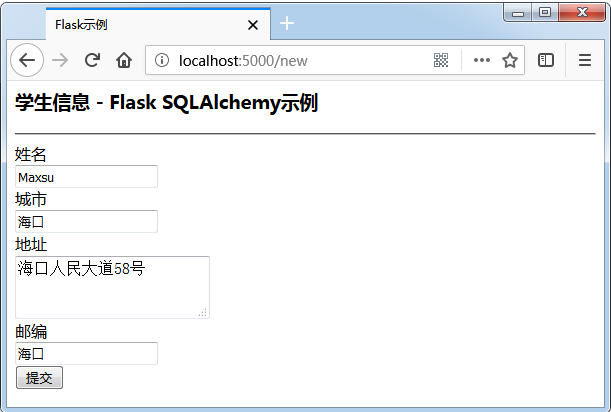
填写表单并提交,主页将提交的数据列出来。操作之后,将看到如下所示的输出。

Sijax
Sijax代表’Simple Ajax’,它是一个Python/jQuery库,旨在帮助Flask开者者轻松地将Ajax引入到应用程序。 它使用jQuery.ajax来发出AJAX请求。
安装
Flask-Sijax的安装非常简单,使用以下命令 -
pip install flask-sijax
Shell
配置
- SIJAX_STATIC_PATH - Sijax javascript文件的静态路径。 默认位置是
static/js/sijax。 在这个文件夹中,保存了sijax.js和json2.js文件。 - SIJAX_JSON_URI - 加载
json2.js静态文件的URI
Sijax使用JSON在浏览器和服务器之间传递数据。因此,浏览器需要本地支持JSON或从json2.js文件获得JSON支持。
以这种方式注册的函数不能提供Sijax功能,因为默认情况下它们不能使用POST方法访问(并且Sijax使用POST请求)。
要使View函数能够处理Sijax请求,可以使用@app.route('/url',methods = ['GET','POST'])通过POST对其进行访问,或使用类似@flask_sijax.route辅助装饰器 -
@flask_sijax.route(app, '/hello')
Python
每个Sijax处理函数(像这样)都会自动接收至少一个参数,就像Python将“self”传递给对象方法一样。 ‘obj_response’参数是函数返回浏览器的对象。
def say_hi(obj_response):
    obj_response.alert('Hi sijax!')
Python
当检测到Sijax请求时,Sijax像这样处理它 -
g.sijax.register_callback('say_hi', say_hi)
    return g.sijax.process_request()
Python
Sijax应用程序
最小的Sijax应用程序代码如下所示 -
import os
from flask import Flask, g
from flask_sijax import sijax

path = os.path.join('.', os.path.dirname(__file__), 'static/js/sijax/')
app = Flask(__name__)

app.config['SIJAX_STATIC_PATH'] = path
app.config['SIJAX_JSON_URI'] = '/static/js/sijax/json2.js'
flask_sijax.Sijax(app)

@app.route('/')
def index():
   return 'Index'

@flask_sijax.route(app, '/hello')
def hello():
    def say_hi(obj_response):
       obj_response.alert('Hi there!')
    if g.sijax.is_sijax_request:
       # Sijax request detected - let Sijax handle it
       g.sijax.register_callback('say_hi', say_hi)
       return g.sijax.process_request()
       return _render_template('sijaxexample.html')

if __name__ == '__main__':
    app.run(debug = True)
Python当一个Sijax向服务器请求(一个特殊的jQuery.ajax()请求)时,这个请求在服务器上被g.sijax.is_sijax_request()检测到,在这种情况下,就会自动让Sijax处理请求。
所有使用g.sijax.register_callback()注册的函数都公开给浏览器进行调用。
调用g.sijax.process_request()告诉Sijax执行适当的(之前注册的)函数并将响应返回给浏览器。
部署
开发服务器上的Flask应用程序只能在设置了开发环境的计算机上访问。 这是一种默认行为,因为在调试模式下,用户可以在计算机上执行任意代码。
如果禁用了调试,则通过将主机名设置为:0.0.0.0,可以使网络上的用户可以使用本地计算机上的开发服务器。
app.run(host = ’0.0.0.0’)
Python
这样,您的操作系统会侦听所有公共IP,也就是说,所有请求都会被处理。
部署
要从开发环境切换到完整的生产环境,应用程序需要部署在真正的Web服务器上。 根据您的具体情况,可以使用不同的选项来部署Flask Web应用程序。
对于小型应用程序,可以考虑将其部署在以下任何托管平台上,所有这些平台都提供针对小型应用程序的免费计划。
- Heroku
- dotcloud
- webfaction
Flask应用程序可以部署在这些云平台上。 另外,可以在Google云平台上部署Flask应用程序。 Localtunnel服务允许您在本地主机上共享您的应用程序,而不会混淆DNS和防火墙设置。
如果您倾向于使用专用Web服务器来代替上述共享平台,则可以使用以下选项。
mod_wsgi
mod_wsgi是一个Apache模块,它提供了一个用于在Apache服务器上托管基于Python的Web应用程序的WSGI兼容接口。
安装mod_wsgi
要从PyPi直接安装正式版本,可以运行 -
pip install mod_wsgi
Python要验证安装是否成功,使用start-server命令运行mod_wsgi-express脚本 -
mod_wsgi-express start-server
Shell它将在端口:8000上启动Apache/mod_wsgi。然后,可以通过将浏览器指向 -
http://localhost:8000/
Shell
创建.wsgi文件
应该有一个yourapplication.wsgi 文件。 该文件包含代码mod_wsgi,该代码在启动时执行以获取应用程序对象。 对于大多数应用程序,以下文件应该足够 -
from yourapplication import app as application
Shell确保yourapplication和所有正在使用的库位于python加载路径上。
配置Apache
需要告诉mod_wsgi,应用程序的位置。参考以下配置 -
<VirtualHost *>
   ServerName example.com
   WSGIScriptAlias / C:\yourdir\yourapp.wsgi

   <Directory C:\yourdir>
      Order deny,allow
      Allow from all
   </Directory>

</VirtualHost>
Shell
独立的WSGI容器
有许多以Python编写的流行服务器,其中包含WSGI应用程序并提供HTTP服务。
- Gunicorn
- Tornado
- Gevent
- Twisted Web
FastCGI
FastCGI是Web服务器(如nginix,lighttpd和Cherokee)上Flask应用程序的另一个部署选项。
配置FastCGI
首先,需要创建FastCGI服务器文件,例如它的名称为:yourapplication.fcgiC 。
from flup.server.fcgi import WSGIServer
from yourapplication import app

if __name__ == '__main__':
    WSGIServer(app).run()
Python
nginx和较早版本的lighttpd需要明确传递一个套接字来与FastCGI服务器进行通信。需要将路径传递给WSGIServer的套接字。
WSGIServer(application, bindAddress = '/path/to/fcgi.sock').run()
Python
配置Apache
对于基本的Apache部署,.fcgi 文件将出现在您的应用程序URL中,例如http://example.com/yourapplication.fcgi/hello/。 有以下几种方法来配置应用程序,以便yourapplication.fcgi不会出现在URL中。
<VirtualHost *>
   ServerName example.com
   ScriptAlias / /path/to/yourapplication.fcgi/
</VirtualHost>
Shell
配置lighttpd
lighttpd的基本配置看起来像这样 -
fastcgi.server = ("/yourapplication.fcgi" => ((
   "socket" => "/tmp/yourapplication-fcgi.sock",
   "bin-path" => "/var/www/yourapplication/yourapplication.fcgi",
   "check-local" => "disable",
   "max-procs" => 1
)))

alias.url = (
   "/static/" => "/path/to/your/static"
)

url.rewrite-once = (
   "^(/static($|/.*))$" => "$1",
   "^(/.*)$" => "/yourapplication.fcgi$1"
)
Shell
请记住启用FastCGI,别名和重写模块。 该配置将应用程序绑定到/yourapplication。


